
Previous versions of Microsoft Dynamics NAV (Navision) provide a code coverage tool that is used to trace C/AL Code, and developers had the ability to scan a piece of code which is executed during an action. This was a very helpful debugging tool. Even in NAV 2013, Microsoft shipped the Application tool set with this… Continue reading Using the Application Profiler to Run Code Coverage in NAV 2013 R2
Category: How To NAV
NAV 2015 Application Simplification feature: Auto-fill the No. Field
Microsoft Dynamics NAV 2015 has many new features, one of which applies to various static and transactional pages. This feature is called Application Simplification (Microsoft calls it Simplified UX). The benefit of this feature is that Auto Filled No. fields for documents with unique number series make it faster to process since those fields can… Continue reading NAV 2015 Application Simplification feature: Auto-fill the No. Field
Creating Production Orders in Bulk Using the NAV Planning Worksheet
We have a couple of clients that have not yet gone live with the MRP (Planning Worksheet) functionality in Dynamics NAV. They determine the need for Production Orders outside of Dynamics NAV and then create the production orders one at a time in NAV. There are times when they create over 100 production orders in… Continue reading Creating Production Orders in Bulk Using the NAV Planning Worksheet
How to Change a Page Title Caption in Microsoft Dynamics NAV
I have been asked this question a couple of times, so I thought I would write a blog about it. On every page, some information about the selected record is displayed. For example, in the screenshot of customer card below, the customer no. and name are displayed. The question is, can we control what to display… Continue reading How to Change a Page Title Caption in Microsoft Dynamics NAV
Using the Standard Cost Worksheet in Microsoft Dynamics NAV
If your company is using the Dynamics NAV Standard Cost Method, there are times when you need to establish Standard Costs for Purchase and Produced items. In Dynamics NAV there is functionality and a process for establishing Standard Costs that will update the Standard Costs for the Items, and, just as importantly, create a Revaluation… Continue reading Using the Standard Cost Worksheet in Microsoft Dynamics NAV
No. Field not showing on Documents in NAV 2015
In this blog, we will go over the change in the No field not showing if there is only one No. Series setup for the document. This blog covers Microsoft Dynamics NAV 2015. If you would like instructions for another version of NAV, please contact ArcherPoint. In NAV version 2013 and before, you need to… Continue reading No. Field not showing on Documents in NAV 2015
Phantom Bills of Material in Microsoft Dynamics NAV
There are times when the engineering department will construct a Bill of Material for a functional part of a design, but in production the Bill of Material is never produced as a sub-assembly, but rather is built as part of the final assembly process. A Bill of Material used in this manner is called a… Continue reading Phantom Bills of Material in Microsoft Dynamics NAV
Finding the User ID on Inventory Transactions in Dynamics NAV
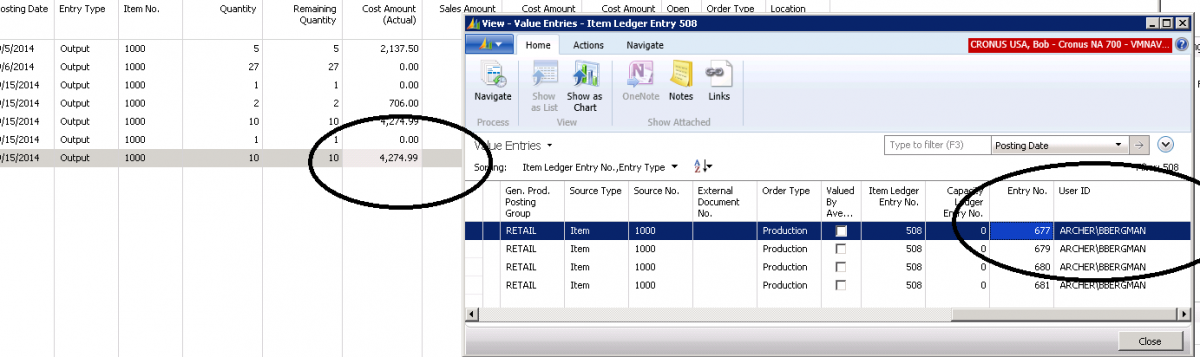
There are times when you would like to know the person’s name that posted an entry to inventory. When you look at the Item Ledger Entry for the User ID, you cannot find it there. To locate the User ID for the person who posted the transaction to inventory, drill down on the Cost Amount… Continue reading Finding the User ID on Inventory Transactions in Dynamics NAV
Landed Cost when Using Dynamics NAV Standard Cost Method
There are times when a company wants to add “Landed Cost Elements” to inventory as part of the procurement process. This could be freight, duty, drayage, or storage. The setup and accounting for a provision for landed cost when using the Standard Cost Method is different than when using all of the other costing methods… Continue reading Landed Cost when Using Dynamics NAV Standard Cost Method
Microsoft Dynamics NAV 2013: A guide to (very) minor editing of pages
The first time I learned how to add a field to a form in Navision, I was astounded at how easy it was to do. It was the first time I had worked with an ERP database and found that the simple act of dragging and dropping fields where you wanted them on the form… Continue reading Microsoft Dynamics NAV 2013: A guide to (very) minor editing of pages