
With the advent of the Dimension Set feature in Microsoft Dynamics NAV (Navision), it can be tricky to figure out how to change the Dimension Set ID assigned to a record in code or how to assign new dimensions to code. If you don’t know what you’re doing, you’ll spend a few hours writing stuff… Continue reading Easily Finding a Dimension Set ID in Microsoft Dynamics NAV
Category: Microsoft Software
Dynamics NAV Web Service Error: “Index was outside the bounds of the array.”
Are you having trouble with web services and seeing a message like: “Index was outside the bounds of the array” in the event viewer? Are you using an Extension codeunit (I’ve also heard them called Helper Codeunits) with a published page in web services? If so, there’s a chance that your extension codeunit contains a… Continue reading Dynamics NAV Web Service Error: “Index was outside the bounds of the array.”
The Magical World of Rectangles in Dynamics NAV RDLC Reports

One of the challenges of report writing in Microsoft Dynamics NAV’s (Navision) Report Definition Language Client (RDLC) reports is creating multiple repeating data sections pulling from a single dataset. The easiest example I can think of comes from sales orders: You want to have your sales order show the sales lines attached to the sales… Continue reading The Magical World of Rectangles in Dynamics NAV RDLC Reports
Dynamics NAV 2015: Confusingly Brilliant Dating using NAV CRM

Having worked in the Microsft Dynamics NAV (Navision) community for more than 12 years, I have seen many changes in the software, but none more confusing, yet strikingly brilliant in its marketing prowess, than the name change to “Dynamics.” Now when I say confusing, I mean confusing in the sense that it is ridiculously confusing… Continue reading Dynamics NAV 2015: Confusingly Brilliant Dating using NAV CRM
On Repurposing NAV Table Fields, or The Forbidden Fruit of Danger
Sometimes, there’s a request to add a new field to a Microsoft Dynamics NAV (Navision) table. You might hear that request and think, “Hey, I don’t need to actually add a new field for that. I can just re-use a totally different field and change the caption and it will be fine. We’re not using… Continue reading On Repurposing NAV Table Fields, or The Forbidden Fruit of Danger
ArcherPoint’s Microsoft Dynamics NAV 2015 Favorites

With all the talk of Microsoft Dynamics NAV 2015 swirling in the community, we took to our own community here at ArcherPoint to see what our developers and internal end users are most excited about. Yes that’s right; we too use NAV and have made the upgrade to NAV 2015. We shared some of our… Continue reading ArcherPoint’s Microsoft Dynamics NAV 2015 Favorites
The Living Monolith, or Creating Custom Codeunits in Dynamics NAV
The codeunit is a specialized object in Microsoft Dynamics NAV (Navision), intended to hold a set of code functions that do something or that are related to a specific functional area. Sometimes, we need a codeunit that stands on its own, and sometimes, we need a sprawling codeunit that covers a lot of different areas.… Continue reading The Living Monolith, or Creating Custom Codeunits in Dynamics NAV
What’s New in Dynamics NAV 2015

The latest release of Microsoft Dynamics NAV (Navision) is filled with many new features that make upgrading and implementing NAV easier and better than ever. The newest version builds on the already powerful features that were included in NAV 2013 and NAV 2013R2, including Office 365 integration. Simply use one login to access your Office… Continue reading What’s New in Dynamics NAV 2015
Finding the User ID on Inventory Transactions in Dynamics NAV
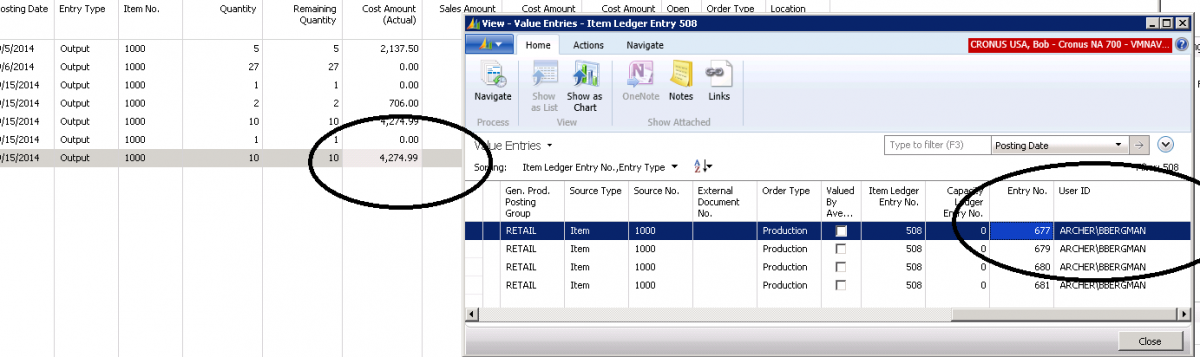
There are times when you would like to know the person’s name that posted an entry to inventory. When you look at the Item Ledger Entry for the User ID, you cannot find it there. To locate the User ID for the person who posted the transaction to inventory, drill down on the Cost Amount… Continue reading Finding the User ID on Inventory Transactions in Dynamics NAV
NAV Objects in NAV 2013 with NAV 2015 PowerShell Commendlets
You can view NAV specific development commandlets by launching the development shell. To launch the Microsoft Dynamics NAV Development Shell, look for either the “Microsoft Dynamics NAV Development Shell” or the “Microsoft Dynamics NAV 2015 Development Shell” on the start menu. You will need to have the Development Environment (C/SIDE) option as part of your NAV install. … Continue reading NAV Objects in NAV 2013 with NAV 2015 PowerShell Commendlets