
October 19, 2014
Interim COGS Account Set Up in Microsoft Dynamics NAV
We frequently get questions about how the Dynamics NAV Account should be set up.
If we look at the General Posting Setup in Dynamics NAV, we see that there are two setup columns:
- COGS
- COGS Interim
The COGS Interim Account is for items that have been shipped, but not invoiced to the customer.
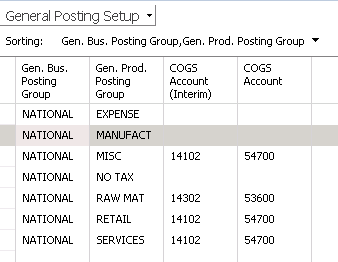
Figure 1 – General Posting Setup in Dynamics NAV
This account should be set up as a Balance Sheet Account as there has been no Revenue recognized, but the items are no longer in the Inventory Account.
For more information on this or any other Dynamics NAV costing topic, please contact ArcherPoint.
Read more “How To” blogs from ArcherPoint for practical advice on using Microsoft Dynamics NAV.
Trending Posts
- Login Error: Communication protocol mismatch between client and server
- How to Make Measures Total Correctly in Power BI Tables
- The Microsoft Technology Stack – What Is It & Why Should You Care?
- MRP vs. MPS: Choosing the Right Planning Approach for Your Manufacturing Business
- Guide to How Manufacturers Can Implement Quality Control Systems Using Business Central
Stay Informed
Choose Your Preferences
"*required" indicates required fields