
Combining Agile and Waterfall for ERP Implementation Success with Monday.com
ERP implementation success depends less on the software and more on how the project is managed. Even the best technology can struggle when teams lack visibility, requirements change unexpectedly, or project governance breaks down. That’s why many organizations are moving away from purely Agile or purely Waterfall methodologies and adopting a hybrid approach that combines structured oversight with delivery flexibility.
At ArcherPoint by Cherry Bekaert, we’ve found that Monday.com provides an effective platform for managing this balance. Supporting both executive-level project governance and Agile team execution helps organizations maintain visibility, accountability, and momentum throughout the implementation lifecycle.
Why Hybrid ERP implementations deliver better results
ERP implementations are complex because they span multiple workstreams with fundamentally different needs. In most implementations, holistic thinking stops at the preliminary conversations; it rarely extends to how the project is actually run. Instead, this mindset should be utilized throughout project delivery to avoid consequences in other departments. For instance, if a change to inventory is made without consulting finance, what is the downstream impact on the GL? Using Monday.com to improve cross-department visibility helps ensure these impacts do not fall through the cracks.
A waterfall approach gives you a detailed phase-gate timeline but does not easily accommodate change. An agile approach gives you flexibility but lacks anchor points for leadership to track progress against the budget and timeline. Hybrid gives you both. You apply the waterfall methodology for major phases, gate reviews for go/no-go decisions, and milestone dates. You run agile in each of these phases, letting SMEs “sprint” through their deliverables iteratively. This gives the team autonomy to adapt as they learn.
The trick is having a platform that can hold both views without creating two separate systems. This is where Monday.com comes into play.
Building a Hybrid ERP project framework in Monday.com
Creating the executive-level ERP Waterfall board
When building your Monday.com board, start with a high-level board that serves as the backbone. This backbone is your waterfall board (Figure 1). It will be used with your steering committee to represent phase and milestone progress.
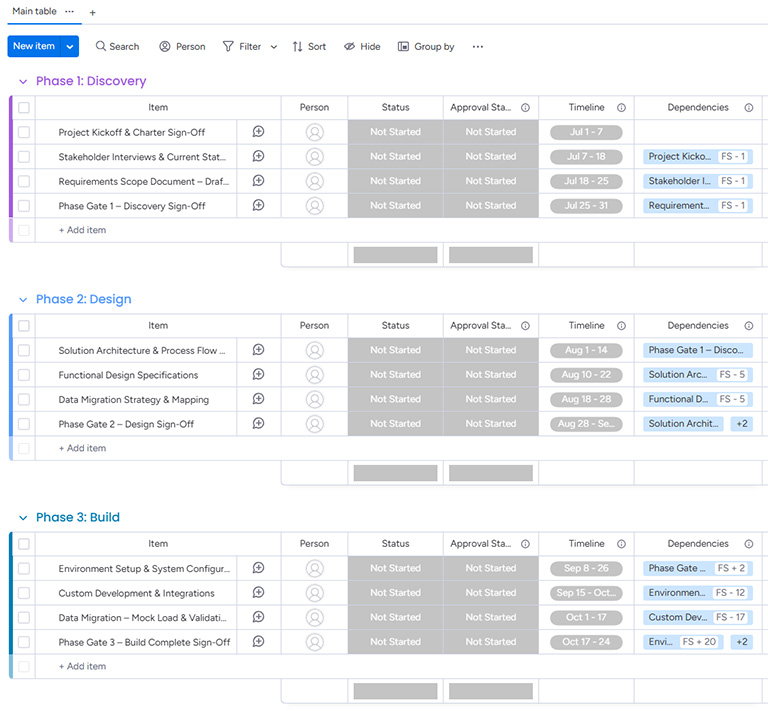
You create groups for each major ERP phase:
- Discovery
- Design
- Build
- Test
- Deploy
- Hypercare
Within each group, add items that reflect key milestones and next phase gate reviews. Use the timeline column to map dependencies and durations. Add a status column for approvals with tags like Not Started, In Progress, Pending Approval, and Approved. Ensure that this board stays lean – no more than 50 items at most. The intent is to lack granularity and speak at a high level. This board will be your source of truth for the “big picture”. It’ll answer the question every executive asks: Are we on track?
A helpful tip: Set up automations for your key decision makers to mitigate approval delays.
Managing requirements and sprints with an Agile delivery board
Now let’s build our Agile board (Figure 2). Create a separate board that breaks down your requirements into categories, and label it ‘requirements’ or ‘user stories’. For example, these categories might read: Finance, Inventory, POS, Hospitality, Warehousing, and Data Migration. Each category will include a set of items to be addressed.
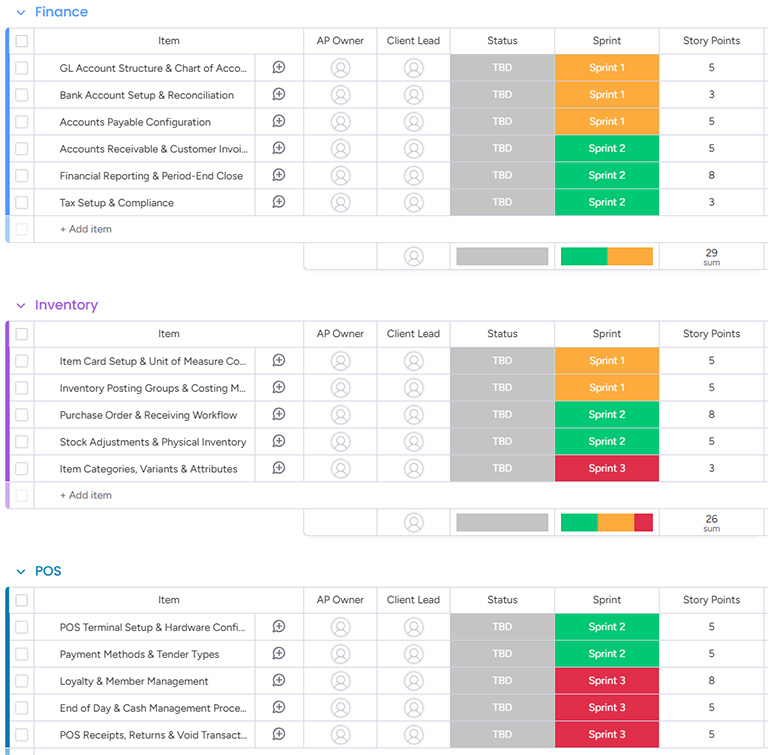
We recommend the following columns at a minimum within this board:
- Task: This lists out the requirements
- Sprint: Sprint 1, Sprint 2, Sprint 3, etc.
- Timeline: Broken down into 3–4-week time blocks
- Hours or Story Points: Effort assigned for each requirement
- Whether you choose hours or story points will depend on the style your client prefers. Hybrid means adaptable. The cookie-cutter approach doesn’t work for every project.
- Status: TBD, Ready, In Progress, Complete, Client in Review, and Accepted
Once the board is set up, you can start assigning what requirements can be met within the 3–4 week time block. Both parties must agree upon this assignment. The SMEs who are doing the configuration, testing, and documentation are on the agile board. Collectively, we run through requirements from start to finish within these sprint cycles. Throughout the project, we will measure velocity using these data points.
Taking the next step
Successful ERP project management requires both structure and flexibility. Organizations need executive-level visibility into milestones, budgets, and risks, while also enabling project teams to adapt as requirements evolve. A hybrid methodology provides that balance, and Monday.com offers a practical way to manage both perspectives within a single platform.
Contact ArcherPoint by Cherry Bekaert to learn how we can help with your Microsoft Dynamics 365 Business Central implementation, upgrades, and updates.
In a future article, we’ll explore how to connect these boards, measure project velocity, and use data-driven insights to keep ERP implementations on track.
Trending Posts
- Login Error: Communication protocol mismatch between client and server
- How to Make Measures Total Correctly in Power BI Tables
- The Microsoft Technology Stack – What Is It & Why Should You Care?
- MRP vs. MPS: Choosing the Right Planning Approach for Your Manufacturing Business
- Designing a Connected Student Engagement Technology Stack
Stay Informed
Subscribe to Communications
"*required" indicates required fields