
Dynamics GP End of Support: How to Plan Your Move to Business Central

For decades, Microsoft Dynamics GP has been a trusted ERP platform for thousands of businesses. It has helped organizations manage financials, purchasing, inventory, payroll, manufacturing, and distribution while supporting steady growth and operational efficiency.
But every technology platform eventually reaches the end of its lifecycle.
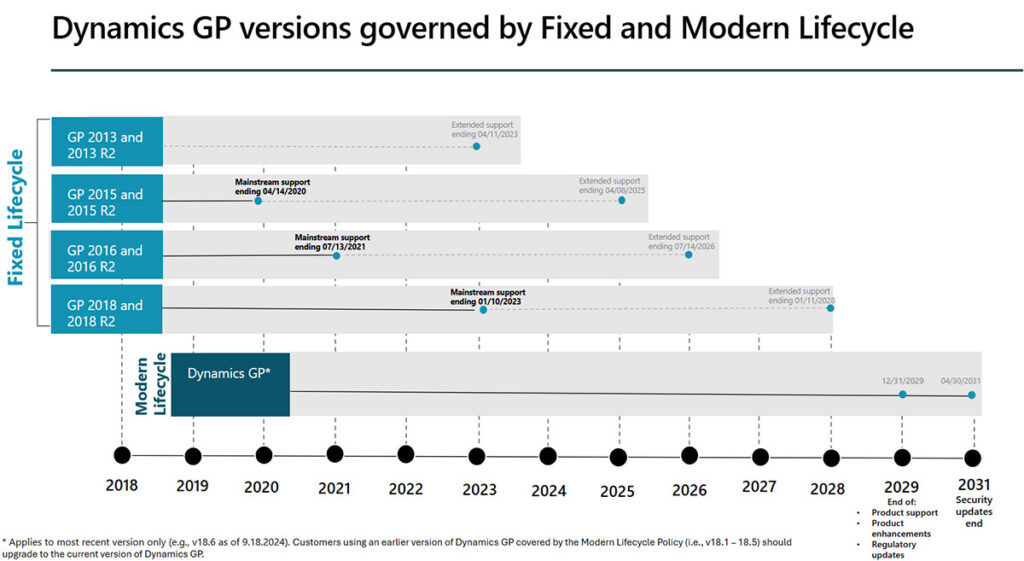
Microsoft has announced that product support and updates for Dynamics GP will end on December 31, 2029, with security patches ending on April 30, 2031. Microsoft has also made it clear that its strategic direction is to move Dynamics GP users to Business Central. While organizations still have time to plan their next ERP, beginning the migration process early provides greater flexibility, reduces risk, and helps ensure a smoother transition to a modern cloud platform.
For businesses still running Dynamics GP, the message isn’t that you need to replace your ERP tomorrow. It is now time to begin planning so your organization can transition on its own schedule rather than under pressure.
Understanding the Dynamics GP end-of-support timeline
The announced dates provide organizations with several years to prepare. Through the end of 2029, Microsoft will continue providing product support, regulatory and tax updates, service packs, and technical support. Security updates will continue through April 30, 2031, if needed.
That may sound like plenty of time, but ERP projects are rarely quick. Selecting a new solution, budgeting for the investment, preparing your data, redesigning business processes, training users, and completing the implementation can easily take a year or more for many organizations.
Companies that begin planning now have the advantage of making thoughtful decisions rather than rushing to meet a deadline.
Why you shouldn’t wait for Microsoft to extend GP support
Whenever a well-established business application approaches retirement, it’s common to wonder whether the vendor might extend support.
While no one can predict the future, organizations should not base their technology strategy on the expectation that Microsoft will reverse its decision. Microsoft has publicly communicated its roadmap and continues to invest heavily in Dynamics 365 cloud applications rather than developing new functionality for Dynamics GP. It has also identified Dynamics 365 Business Central as the recommended path for most current GP customers.
Planning based on published information is almost always less risky than hoping for an extension that may never come.
How to start planning your Dynamics GP migration
An ERP migration is much more than a software installation. It is an opportunity to modernize business processes, improve reporting, eliminate manual tasks, and position the organization for future growth.
That planning should begin well before implementation.
One of the first steps is developing a realistic budget. In addition to software licensing, organizations should account for implementation services, data migration, integrations, training, change management, and internal project resources. Having a multi-year financial plan helps avoid surprises and allows the project to move forward when the organization is ready.
Selecting the right ERP is equally important. Every business has different requirements, and today’s cloud ERP market offers more options than ever. While Microsoft recommends Business Central for many GP customers, organizations should still evaluate how well any solution aligns with their operations, reporting requirements, industry needs, and long-term business strategy.
Choosing an experienced implementation partner is just as critical. Even the best ERP software cannot compensate for poor planning or an implementation that fails to reflect how the business actually operates. A knowledgeable partner can help assess requirements, recommend best practices, minimize disruption, and guide the organization through each phase of the transition.
Finally, now is an excellent time to begin documenting your business processes. Many organizations discover that important procedures exist only in employees’ institutional knowledge. Mapping workflows for finance, purchasing, inventory, sales, reporting, approvals, and other key processes makes ERP selection easier and often reveals opportunities for improvement before implementation even begins.
The risks of staying on Dynamics GP after support ends
Some organizations may decide to continue using Dynamics GP after Microsoft ends mainstream support. While the software will not suddenly stop working, operating an unsupported ERP platform introduces increasing business risk.
Perhaps the most immediate concern is the loss of regulatory and tax updates. As tax laws, reporting requirements, and compliance regulations evolve, organizations will no longer receive Microsoft updates designed to keep the system current. Depending on the industry, this can increase compliance challenges and require additional manual work.
Security also becomes a growing concern. After April 30, 2031, Microsoft will no longer provide security patches for Dynamics GP. As cybersecurity threats continue to evolve, operating business-critical software without vendor security updates can expose organizations to unnecessary risk.
There are operational considerations as well. As technology continues to advance, unsupported software becomes increasingly difficult to integrate with newer applications, cloud services, and evolving business requirements. Recruiting employees with expertise in legacy systems may also become more challenging over time.
While these risks may not be significant immediately after support ends, they generally increase with each passing year.
Why Business Central is the recommended next step
Many organizations initially view ERP migration as a technology project. In reality, it is a business modernization initiative.
Modern cloud ERP platforms like Dynamics 365 Business Central provide capabilities that extend well beyond traditional financial management. Real-time reporting, workflow automation, AI-assisted productivity, cloud accessibility, advanced analytics, and seamless integration with Microsoft 365 are becoming standard expectations rather than optional features.
For many organizations, moving beyond Dynamics GP is an opportunity to simplify operations, improve decision-making, and build a technology platform that supports growth for years to come.
Start planning your move from GP to Business Central today
The good news is that businesses running Dynamics GP still have time to plan carefully.
Organizations that begin early typically have more flexibility, more options, and a smoother transition than those forced to migrate under deadline pressure.
The most important step is getting started. Here are some resources to help you jumpstart the conversation:
- Moving to Business Central from Dynamics GP: What Marketing Doesn’t Tell You
- Dynamics GP to Business Central Migration: What a Quick Start Really Takes
- Transitioning from Dynamics GP to Business Central: Key Considerations
- The Cost of Outdated ERP Systems: Why Upgrading Matters
- Expert Tips to Plan a Move from Dynamics GP to Dynamics 365 Business Central
If you’re evaluating your next ERP platform or developing a migration roadmap from Dynamics GP, ArcherPoint by Cherry Bekaert can help. Our team has guided organizations through ERP evaluations, implementations, and cloud migrations from GP to Business Central for decades. We can help you assess your current environment, define your requirements, and develop a practical transition plan that supports your business today and prepares it for the future.
Trending Posts
- Login Error: Communication protocol mismatch between client and server
- How to Make Measures Total Correctly in Power BI Tables
- The Microsoft Technology Stack – What Is It & Why Should You Care?
- MRP vs. MPS: Choosing the Right Planning Approach for Your Manufacturing Business
- Designing a Connected Student Engagement Technology Stack
Stay Informed
Subscribe to Communications
"*required" indicates required fields