
Why ArcherPoint’s Power Approvals App Outperforms Business Central’s Base Approval Engine

Approvals are the backbone of process control in Microsoft Dynamics 365 Business Central (BC). Whether you’re validating a purchase order, reviewing a sales quote, or ensuring that a production BOM is ready for use, the approval step safeguards quality, compliance, and budget.
But if you’ve tried using or customizing BC’s out-of-the-box approval workflow—or even set up something in Power Automate—you’ve probably run into limitations that cost time, money, and flexibility. That’s exactly why ArcherPoint created the Power Approvals app for Business Central SaaS: To deliver the approval flexibility you need without the cost and complexity of customizing Microsoft’s base engine.
The problem with base approval workflows in Business Central
Microsoft provides a “base” approval workflow in BC. While it works for some standard scenarios, it has serious limitations:
- Expensive to customize –If you need approval for something outside the default list, for example, a production BOM, extending the base approval engine can take a developer 7–8 days for design, development, testing, and deployment. That’s both costly and slow.
- One approval matrix for all workflows – BC’s standard engine uses a shared approval matrix across all workflows. If your sales orders and purchase orders need to route to different people under different conditions, you’ll need custom development.
- Limited mobile capabilities – Many approvers travel or work remotely. BC’s mobile app has limitations, and base approvals don’t include push notifications—just plain emails with minimal detail.
- Minimal notification content – The email notifications provided by the base approval workflow typically only include document type, number, and amount. They do not include key context from the record being requested for approval. Adding those items requires custom development.
- Upgrade risks – Customizations to the base engine can break when Microsoft updates the underlying workflow objects, requiring costly re-work.
- Complex, rigid architecture – Extending BC’s approval engine means navigating a tangle of interconnected objects, including workflow events, responses, user setups, notification entries, and dependencies, which makes it inflexible and error-prone.
In short, while BC’s base approvals work for simple, static processes, they can become an expensive bottleneck when you need flexibility, rich notifications, or integration with other tools.
Why Power Automate alone isn’t the answer
Microsoft Power Automate does have an “Approvals” connector—but it also falls short for BC-centric workflows:
- Static approver lists – Approvers are hardcoded in the flow. If your approval hierarchy changes, you will need to edit the flow manually.
- No native visibility in Business Central – Approvals happen in Power Automate, so users can’t easily see approval status or approver details inside BC.
- Limited context – Like the base engine, Power Automate approvals don’t easily pull rich, contextual BC data into notifications without additional work.
Power Automate is powerful, but when used alone for BC approvals, it often sacrifices integration, flexibility, and ease of administration.
Benefits of ArcherPoint’s Power Approvals app
Power Approvals combines the best of both worlds: The deep BC integration with the flexibility and reach of Power Automate without the high customization costs.
Built for Business Central SaaS and available on AppSource, Power Approvals delivers:
- Flexible, per-workflow approval matrices – Unlike BC’s one-size-fits-all approach, Power Approvals lets you define separate approval matrices for each workflow card—sales orders, sales invoices, purchase orders, customer records, vendor records, item journals, and more. Each can have its own approvers and approval limits.
- Easy and affordable extensibility – Adding a new approval workflow in BC’s base engine can take a week of development work. With Power Approvals, it’s faster and far less expensive.
- Rich, dynamic notifications – You can choose any fields from the related BC table to include in the email body per workflow, for example, credit limits, vendor email ID, and customer state. These details appear directly in Outlook and Teams notifications, providing approvers with everything they need to make informed decisions without needing to open Business Central. If they would like to review the record in Business Central, the notification body will provide a record link, which can direct the approver directly to the requested record.
- Push notifications in Teams and Outlook – Power Approvals is integrated with Microsoft Teams and Outlook via Power Automate, allowing it to send real-time push notifications to mobile devices. Approvers can approve or reject directly from Teams adaptive cards or Outlook messages—anywhere, anytime.
- Upgrade-friendly architecture – Because Power Approvals doesn’t extend BC’s base approval objects, it avoids the risk of breakage when Microsoft updates its workflow engine. That means lower maintenance costs and fewer upgrade headaches.
- Multiple approver routing options – Approver routing options make it easy to model real-world approval structures without having to rewrite existing flows. Administrators can define approval routing based on:
- Approver chain – All users in the hierarchy up to the first qualified approver.
- Direct approver – Only the designated direct approver.
- First qualified approver – The first approver meeting the approval limit requirement.
- Specific approver – A named user.
How Power Approvals works in practice
Setting up Power Approvals is straightforward:
- Create a number series for Power Approval Workflows.
- Configure a new workflow. Select the table (e.g., Sales Header, Item Journal), define the conditions, and specify the approval type and matrix.
- Add dynamic email body fields. Select any table fields to display in notifications.
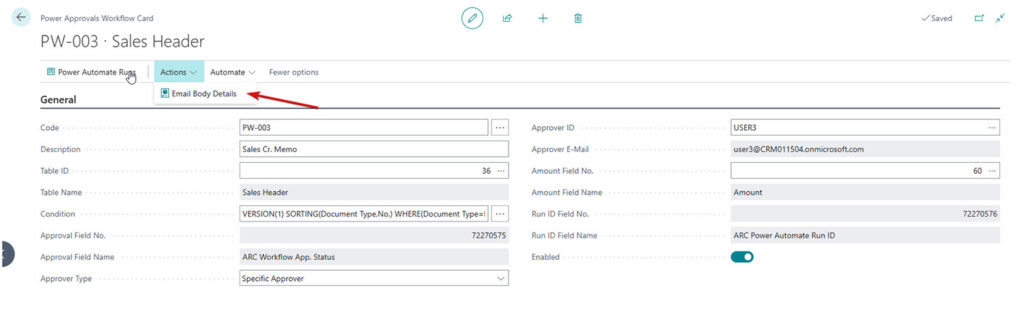 Select Actions > Email Body Details…
- Send for approval. Once a document meets the trigger condition, the system identifies the correct workflow and approver, changes the status to “Pending Approval,” and locks edits until the document is approved.

- Receive notifications. Approvers get push notifications and emails with context-rich details and a direct link to the BC record.
- Approve or Reject. Approvers can approve or reject from Teams, Outlook, or the Power Automate portal. Decisions update BC in real time.

The result: Approvals move faster, decision quality improves, and both admins and developers spend less time fighting the system.
A Customer Modification Approval feature enables the Sales Manager/Administrator to manage the list of fields that require approval when modified.
For improved visibility, we have also added Change Log Tracking to the Customer card, allowing the approver to track the changes made.
Real-world results
ArcherPoint has deployed Power Approvals internally and for customers across various industries, including manufacturing and retail. These clients benefited from faster setup, richer notifications, streamlined approval processes, and the flexibility to evolve their approval processes without heavy development costs.
A cost-effective way to manage approvals for any size organization
Power Approvals is available for a free trial and is charged per tenant, not per user. That makes it accessible for organizations of all sizes seeking enterprise-level approval flexibility without the associated enterprise-level costs.
If you’re a Business Central user, developer, or administrator tired of the base approval engine’s limitations—or frustrated with maintaining Power Automate flows—Power Approvals offers a proven, cost-effective alternative.
With flexible per-workflow matrices, dynamic notifications, mobile-friendly approvals, and upgrade-safe architecture, it’s the smarter way to manage approvals in BC SaaS.
Try Power Approvals free for 30 days on Microsoft AppSource or contact ArcherPoint by Cherry Bekaert to learn more.
Trending Posts
- Login Error: Communication protocol mismatch between client and server
- How to Make Measures Total Correctly in Power BI Tables
- The Microsoft Technology Stack – What Is It & Why Should You Care?
- MRP vs. MPS: Choosing the Right Planning Approach for Your Manufacturing Business
- Creating a Date Table in Power BI
Stay Informed
Choose Your Preferences
"*required" indicates required fields