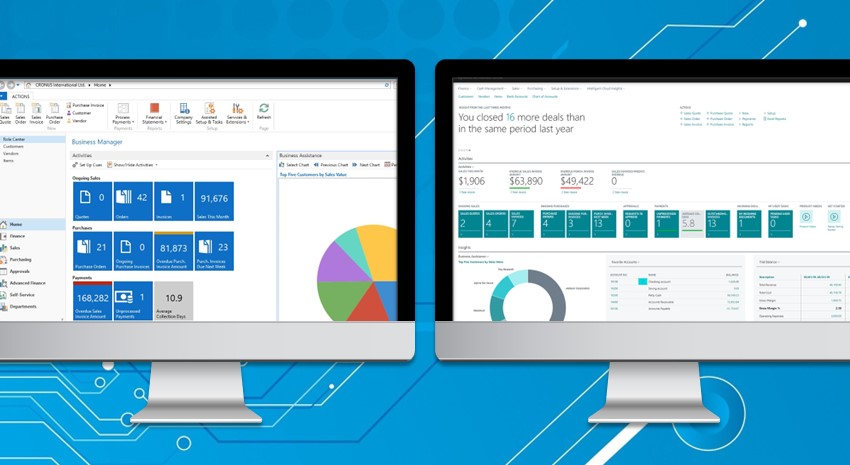
We love Microsoft Dynamics NAV here at ArcherPoint, but we also love what we’re seeing in Business Central and strongly urge our customers to plan for an upgrade as soon as your schedule and budget permit. But there are so many questions and frankly, a lot of misinformation out there about moving from NAV to… Continue reading Upgrading from Microsoft Dynamics NAV to Business Central How Much Will It Cost
Category: Business Central
Top Read Blogs of 2019

ArcherPoint posts about 150 blogs each year. Topics range from thought leadership to developer tips and everything in between to address questions and the thirst for knowledge that our clients in the industries of manufacturing, distribution, retail, print, and equipment rental have. Our most read blogs in 2019 were (drumroll, please): How to Create a… Continue reading Top Read Blogs of 2019
Upgrading from Microsoft Dynamics NAV to Business Central: Moving Data
We love Microsoft Dynamics NAV here at ArcherPoint, but we also love what we’re seeing in Business Central and strongly urge our customers to plan for an upgrade as soon as your schedule and budget permit. But there are so many questions and frankly, a lot of misinformation out there about moving from NAV to… Continue reading Upgrading from Microsoft Dynamics NAV to Business Central: Moving Data
Upgrading from Microsoft Dynamics NAV to Business Central: What Will Happen with My Add-Ons?

At ArcherPoint, we love Microsoft Dynamics NAV, but we believe that a move to Business should be on everyone’s list. We understand you probably have questions about what it’s like to upgrade, and we want to help answer them. In this blog series, we answer the most frequently asked questions we hear from our NAV… Continue reading Upgrading from Microsoft Dynamics NAV to Business Central: What Will Happen with My Add-Ons?
Upgrading from Microsoft Dynamics NAV to Business Central: What are Events and Extensions?
Microsoft Dynamics NAV users looking to upgrade will want to consider upgrading to Dynamics 365 Business Central (BC), the latest version of NAV. But what does a move to BC look like? And how much will it cost? At ArcherPoint, we specialize in upgrades. We love NAV and believe that a move to BC is… Continue reading Upgrading from Microsoft Dynamics NAV to Business Central: What are Events and Extensions?
Upgrading from Microsoft Dynamics NAV to Business Central: What Will It Look Like?
If you’re using Microsoft Dynamics NAV—it’s likely an upgrade to Business Central (BC) is in your future. With a big product change like this, you’re bound to have questions—and maybe some concerns, too. At ArcherPoint, we clearly love NAV and BC and believe you should be excited about the move, but we understand your concerns.… Continue reading Upgrading from Microsoft Dynamics NAV to Business Central: What Will It Look Like?
Improving Business through Mixed Reality and AI in Microsoft Dynamics 365

Microsoft has released several new Dynamics 365 apps that leverage mixed reality and AI to help businesses cut costs, enhance the customer experience, and enable employees to be more productive. While virtual reality uses 3D images and visual hardware to create a virtual world around you, mixed reality allows users to add data to their… Continue reading Improving Business through Mixed Reality and AI in Microsoft Dynamics 365
The Risks and Rewards of Upgrading to Microsoft Dynamics 365 Business Central: What Decision Makers Need to Know

Risk doesn’t bother me; I’m more passionate about the payout. People say I think outside the box. I don’t actually like that term. From my perspective, I’m simply not only looking at the easily measured, tangible metrics to make decisions, but I’m also observing the intangible. These are metrics that either some believe are non-measurable… Continue reading The Risks and Rewards of Upgrading to Microsoft Dynamics 365 Business Central: What Decision Makers Need to Know
Microsoft Dynamics Business Central: A Sneak Peek at What’s Coming in October

For organizations using Microsoft Dynamics Business Central or for those looking at upgrading, October 2019 is a month to look forward to. While the 2019 April release introduced enhancements to productivity, Wave 2, which is set for October, promises to be an exciting one as well. Microsoft’s Independent Software Vendor (ISV) ecosystem is made up… Continue reading Microsoft Dynamics Business Central: A Sneak Peek at What’s Coming in October
Microsoft Announces Dynamics 365 Business Central Licensing Updates

If your company purchased Microsoft Dynamics NAV licenses prior to May 1, 2019 and intend to transition to Microsoft Dynamics 365 Business Central in the future, Microsoft has increased the full user conversion ratio for perpetual to named user from 1:2 to 1:3. What does this mean? Dynamics NAV perpetual licenses are based on concurrent… Continue reading Microsoft Announces Dynamics 365 Business Central Licensing Updates