
Using a Frozen BOM to Roll up Standard Cost in Microsoft Dynamics NAV

When you are rolling up Standard Costs at the beginning or end of a Fiscal Period, it is often desirable to keep a copy of the “Frozen BOM” for reference purposes. This will help answer the question, “What was the composition of the BOM when the Standard Costs were rolled up?”
To do this, create a Production BOM Version for each BOM with the version number—something like “FY2013” with a starting date far into the future, like 12/31/2113. In this way, the BOM will never be inadvertently used for anything but the cost rollup.
NOTE: To create these BOM Versions in bulk for all of your Production BOMs, you will need to contact your Dynamics NAV partner to write a processing report.
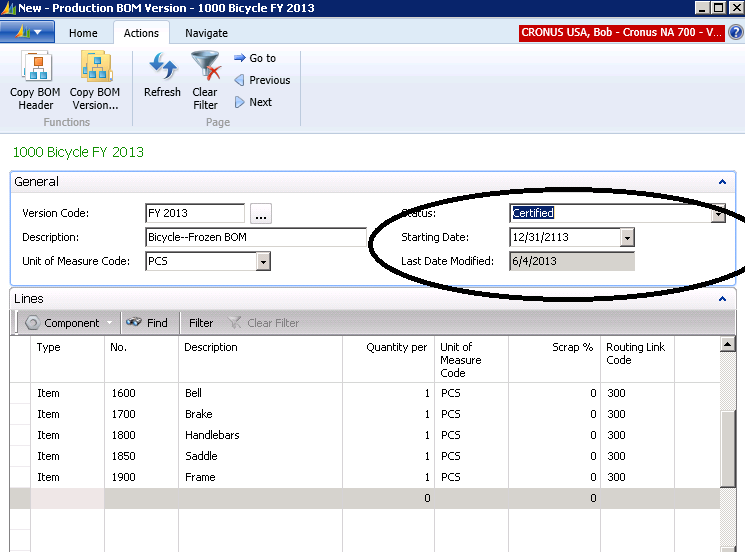
Figure 1 – Create a Production BOM Version for each BOM with the version number using a starting date far into the future, like 12/31/2113
Now, when rolling up the Standard Cost using the Dynamics NAV Standard Cost Worksheet, use the “Calculation Date” of 12/31/2113 so that the system will use that version of the Production BOM.
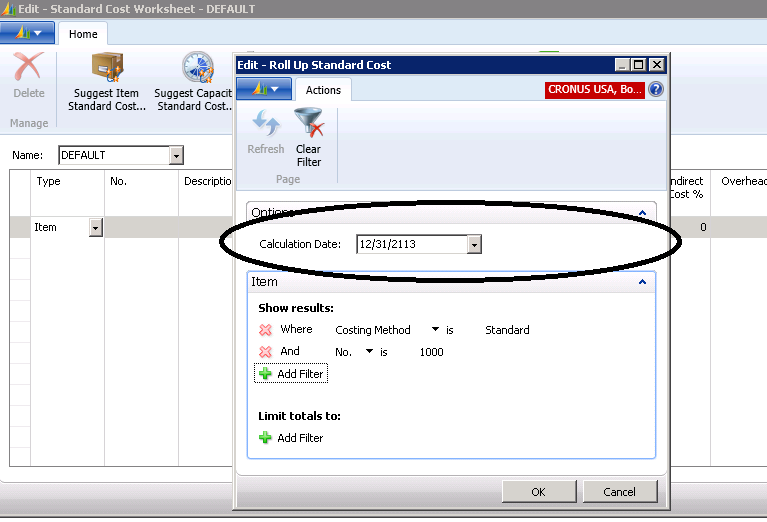
Figure 2 – Roll up the Standard Cost with the Dynamics NAV Standard Cost Worksheet using the new Calculation Date
The result of this is that you have used the Production BOM Version FY 2013 for the rollup, and that Version will be saved for future reference.
For more information on Standard Cost rollups for another Dynamics Cost topic, please contact ArcherPoint.
Read more “How To” blogs from ArcherPoint for practical advice on using Microsoft Dynamics NAV.
Trending Posts
- Login Error: Communication protocol mismatch between client and server
- How to Make Measures Total Correctly in Power BI Tables
- The Microsoft Technology Stack – What Is It & Why Should You Care?
- MRP vs. MPS: Choosing the Right Planning Approach for Your Manufacturing Business
- Designing a Connected Student Engagement Technology Stack
Stay Informed
Subscribe to Communications
"*required" indicates required fields